Short answer: e-scouting is studying satellite imagery, topo maps, and aerial data to find likely bedding, food, travel routes, and stand sites before you walk in — so your boots-on-the-ground time confirms a plan instead of starting from scratch and bumping deer.
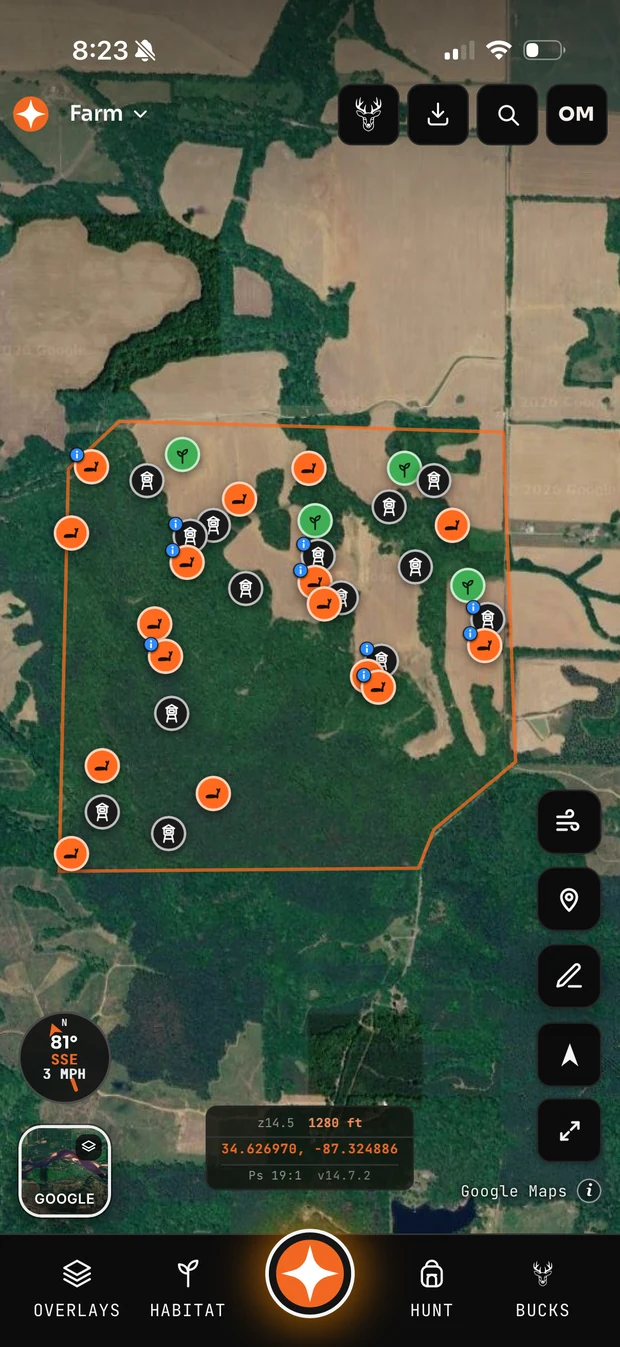
A simple e-scouting workflow
- Mark the boundaries and note access, roads, and neighboring pressure.
- Find the food: ag fields, food plots, oak flats, clear-cuts, and edges on imagery.
- Find the bedding: thick cover on satellite, plus points, benches, and leeward ridges on topo.
- Connect them: the travel corridors between bedding and food, squeezed by terrain funnels, are your stand sites.
- Plan entry/exit and wind for each spot so you can hunt it clean.
Why it works
Deer relate to the landscape — cover, food, terrain, and pressure — and most of that is visible from above. A good e-scout narrows a 200-acre property down to a handful of high-odds setups before you risk educating a single deer.
Do it all in one place
Contors puts Google and Esri imagery, USGS topo and contours, hillshade, public-land and parcel layers, and crop data on one map, then lets you drop stands and bedding, draw your boundary for acreage, and grade each spot against the wind — a complete e-scout from your phone or laptop.